Saturday, October 15, 2016

Helping webmasters re-secure their sites

Tags
(Cross-posted from the Google Security Blog.)
Every week, over 10 million users encounter harmful websites that deliver malware and scams. Many of these sites are compromised personal blogs or small business pages that have fallen victim due to a weak password or outdated software. Safe Browsing and Google Search protect visitors from dangerous content by displaying browser warnings and labeling search results with 'this site may harm your computer'. While this helps keep users safe in the moment, the compromised site remains a problem that needs to be fixed.

Unfortunately, many webmasters for compromised sites are unaware anything is amiss. Worse yet, even when they learn of an incident, they may lack the security expertise to take action and address the root cause of compromise. Quoting one webmaster from a survey we conducted, “our daily and weekly backups were both infected” and even after seeking the help of a specialist, after “lots of wasted hours/days” the webmaster abandoned all attempts to restore the site and instead refocused his efforts on “rebuilding the site from scratch”.

In order to find the best way to help webmasters clean-up from compromise, we recently teamed up with the University of California, Berkeley to explore how to quickly contact webmasters and expedite recovery while minimizing the distress involved. We’ve summarized our key lessons below. The full study, which you can read here, was recently presented at the International World Wide Web Conference.

When Google works directly with webmasters during critical moments like security breaches, we can help 75% of webmasters re-secure their content. The whole process takes a median of 3 days. This is a better experience for webmasters and their audience.
How many sites get compromised?


Number of freshly compromised sites Google detects every week.

Over the last year Google detected nearly 800,000 compromised websites—roughly 16,500 new sites every week from around the globe. Visitors to these sites are exposed to low-quality scam content and malware via drive-by downloads. While browser and search warnings help protect visitors from harm, these warnings can at times feel punitive to webmasters who learn only after-the-fact that their site was compromised. To balance the safety of our users with the experience of webmasters, we set out to find the best approach to help webmasters recover from security breaches and ultimately reconnect websites with their audience.
Finding the most effective ways to aid webmaster

  1. Getting in touch with webmasters: One of the hardest steps on the road to recovery is first getting in contact with webmasters. We tried three notification channels: email, browser warnings, and search warnings. For webmasters who proactively registered their site with Search Console, we found that email communication led to 75% of webmasters re-securing their pages. When we didn’t know a webmaster’s email address, browser warnings and search warnings helped 54% and 43% of sites clean up respectively.
  2. Providing tips on cleaning up harmful content: Attackers rely on hidden files, easy-to-miss redirects, and remote inclusions to serve scams and malware. This makes clean-up increasingly tricky. When we emailed webmasters, we included tips and samples of exactly which pages contained harmful content. This, combined with expedited notification, helped webmasters clean up 62% faster compared to no tips—usually within 3 days.
  3. Making sure sites stay clean: Once a site is no longer serving harmful content, it’s important to make sure attackers don’t reassert control. We monitored recently cleaned websites and found 12% were compromised again in 30 days. This illustrates the challenge involved in identifying the root cause of a breach versus dealing with the side-effects.
Making security issues less painful for webmasters—and everyone

We hope that webmasters never have to deal with a security incident. If you are a webmaster, there are some quick steps you can take to reduce your risk. We’ve made it easier to receive security notifications through Google Analytics as well as throughSearch Console. Make sure to register for both services. Also, we have laid out helpful tips for updating your site’s software and adding additional authentication that will make your site safer.

If you’re a hosting provider or building a service that needs to notify victims of compromise, understand that the entire process is distressing for users. Establish a reliable communication channel before a security incident occurs, make sure to provide victims with clear recovery steps, and promptly reply to inquiries so the process feels helpful, not punitive.

As we work to make the web a safer place, we think it’s critical to empower webmasters and users to make good security decisions. It’s easy for the security community to be pessimistic about incident response being ‘too complex’ for victims, but as our findings demonstrate, even just starting a dialogue can significantly expedite recovery.

How we fought webspam in 2015

Tags

Search is a powerful tool. It helps people to find, share, and access an amazing wealth of content regardless of how they connect or where they are located. As part of Google’s search quality team, we work hard to ensure that searchers see high quality search results—and not webspam. We fight spam through a combination of algorithms and manual reviews to ensure that sites don’t rise in search results through deceptive or manipulative behavior, especially because those sites could harm or mislead users.

Below are some of the webspam insights we gathered in 2015, including trends we’ve seen, what we’re doing to fight spam and protect against those trends, and how we’re working with you to make the web better.


2015 webspam trends

  • We saw a huge number of websites being hacked – a 180% increase compared to the previous year. Stay safe on the web and take preventative measures to protect your content on the web.
  • We saw an increase in the number of sites with thin, low quality content. Such content contains little or no added value and is often scraped from other sites.


2015 spam-fighting efforts

  • As always, our algorithms addressed the vast majority of webspam and search quality improvement for users. One of our algorithmic updates helped to remove the amount of hacked spam in search results.
  • The rest of spam was tackled manually. We sent more than 4.3 million messages to webmasters to notify them of manual actions we took on their site and to help them identify the issues.
  • We saw a 33% increase in the number of sites that went through spam clean-up efforts towards a successful reconsideration process.


Working with users and webmasters for a better web

  • More than 400,000 spam reports were submitted by users around the world. After prioritizing the reports, we acted on 65% of them, and considered 80% of those acted upon to be spam. Thanks to all who submitted reports and contributed towards a cleaner web ecosystem!
  • We conducted more than 200 online office hours and live events around the world in 17 languages. These are great opportunities for us to help webmasters with their sites and for them to share helpful feedback with us as well.
  • The webmaster help forum continued to be an excellent source of webmaster support. Webmasters had tens of thousands of questions answered, including over 35,000 by users designated as Webmaster Top Contributors. Also, 56 Webmaster Top Contributors joined us at our Top Contributor Summit to discuss how to provide users and webmasters with better support and tools. We’re grateful for our awesome Top Contributors and their tremendous contributions!

We’re continuously improving our spam-fighting technology and working closely with webmasters and users to foster and support a high-quality web ecosystem. (In fact, fighting webspam is one of the many ways we maintain search quality at Google.) Thanks for helping to keep spammers away so users can continue accessing great content in Google Search.

Deeper Integration of Search Console in Google Analytics

Tags
Google Analytics helps brands optimize their websites and marketing efforts for all sources of traffic, and Search Console is where website owners manage how they appear in Google organic search results. Today, we are introducing the ability to display Search Console metrics alongside Google Analytics metrics, in the same reports, side by side - giving you a full view of how your site shows up and performs in organic search results.

For years, users of both Search Console and Google Analytics have been able to link the two properties (instructions) and see Search Console statistics in Google Analytics, in isolation. But to gain a fuller picture of your website’s performance in organic search, it’s beneficial to see how visitors reached your site and what they did once they got there.

With this update, you’ll be able to see your Search Console metrics and your Google Analytics metrics in the same reports, in parallel. By combining data from both sources at the landing page level, we’re able to show you a full range of Acquisition, Behavior and Conversion metrics for your organic search traffic. This feature out is rolling out over the coming few weeks, so not everyone will see it immediately.


New Search Console reports combine Search Console and Google Analytics metrics

New Insights

The new reports allow you to examine your organic search data end-to-end and discover unique and actionable insights. Your Acquisition metrics from Search Console, such as impressions and average position, are now available in relation to your Behavior and Conversion metrics from Google Analytics, like bounce rate and pages per session.

Below are some new capabilities resulting from this improved integration:
 • Find landing pages that are attracting many users through Google organic search (e.g., high impressions and high click through rate) but where users are not engaging with the website. In this case, you should consider improving your landing pages.

 • Find landing pages that have high site engagement but are not successfully attracting users from Google organic search  (e.g., have low click through rate). In this case, you might benefit from improving titles and descriptions shown in search.

 • Learn which queries are ranking well for each organic landing page.

 • Segment organic performance by device category (desktop, tablet, mobile) in the new Devices report.
 

New Landing Page report showing Search Console and Google Analytics metrics


Additional Information 

Each of these new reports will display how your organic search traffic performs. As data is joined at the landing page level, Landing Pages, Countries and Devices will show both Search Console and Google Analytics data, while the Queries report will only show Search Console data for individual queries. The same search queries will display in Google Analytics as you see in Search Console today.

As mentioned in our Search Console Help Center, some data may not be displayed, to protect user privacy. For example, Search Console may not track some infrequent queries, and will not display those that include personal or sensitive information.

Also, while the data is displayed in parallel, not all Google Analytics features are available for Search Console data - including segmentation. Any segment that is applied to the new combined reports will only apply to Google Analytics data. You may also see that clicks from Search Console may differ from total sessions in Google Analytics.

 To experience the new combined reports from Search Console and Google Analytics,make sure your properties are linked, and then navigate to the new section “Search Console”, which should appear under “Acquisition” in the left-hand navigation in Google Analytics.

A new mobile friendly testing tool

Tags
Mobile is close to our heart - we love seeing more and more sites make their content available in useful & accessible ways for mobile users. To help keep the ball rolling, we've now launched a new Mobile Friendly Test.
The new tool is linked from Search Console's mobile usability report or available directly at https://search.google.com/search-console/mobile-friendly

The updated tool provides us with room to continue to improve on its functionality, and over time, we expect it to replace the previous Mobile Friendly Test. Additionally, of course this tool also works well on your smartphone, if you need to double-check something there!
We'd like to invite you to take it for a spin, try your website and other sites that you're curious about! Let us know how you like it - either here in the comments or in our

Introducing rich cards

Tags
Rich cards are a new Search result format building on the success of rich snippets. Just like rich snippets, rich cards use schema.org structured markup to display content in an even more engaging and visual format, with a focus on providing a better mobile user experience.
Evolution of search results for queries like [peanut butter cookies recipe]: with rich cards, results are presented in carousels that are easy to browse by scrolling left and right. Carousels can contain cards all from the same site or from multiple sites.
For site owners, this is a new opportunity to stand out in Search results and attract more targeted users to your page. For example, if you have a recipe site, you can build a richer preview of your content with a prominent image for each dish. This visual format helps users find what they want right away, so you're getting users who specifically want that especially delicious cookie recipe you have.
We’re starting to show rich cards for two content categories: recipes and movies. They will appear initially on mobile search results in English for google.com. We’re actively experimenting with more opportunities to provide more publishers with a rich preview of their content.
We’ve built a comprehensive set of tools and completely updated our developer documentation to take site owners and developers from initial exploration through implementation to performance monitoring.
Explore rich card types and identify where your content fits
Browse the new gallery with screenshots and code samples of each markup type.
Test and tweak your markup
We strongly recommend using JSON-LD in your implementation.
  • Find out which fields are essential to mark up in order for a rich card to appear. We’ve also listed additional fields that can enhance your rich cards.
  • See a preview in the revamped Structured Data Testing Tool of how the rich card might appear in Search (currently available for recipes and movies).
  • Use the the Structured Data Testing Tool to see errors as you tweak your markup in real time.

Keep track of coverage and debug errors
Check how many of your rich cards are indexed in the new Search Console Rich Cards report.
  • Keep an eye out for errors (also listed in the Rich Cards report). Each error example links directly to the Structured Data Testing tool so you can test it.
  • Submit a sitemap to help us discover all your marked-up content.
Find opportunities for growth
In the Rich Cards report, you'll see which cards can be enhanced by marking up additional fields.

Monitor performance
A new “Rich results” filter in Search Analytics (currently in a closed beta) will help you track how your rich cards and rich snippets are doing in search: you’ll be able to drill down and see clicks and impressions for both.

Q: Can I keep my existing rich snippets markup?
A: Yes, you can! We’ll keep you posted as the rich result ecosystem evolves.
Q: What about the Structured Data report in Search Console?
A: The Structured Data report will continue to show only top-level entities for the existing rich snippets (Product, Recipe, Review, Event, SoftwareApplication, Video, News article) and for any new categories (e.g., Movies). We plan to migrate all errors from the Structured Data report into the Rich Card report.
Q: What if I use the wrong markup?
A: Technical and quality guidelines apply for rich cards as they do for rich snippets. We will enforce them as before.
Learn more about rich cards in the Search and the mobile content ecosystem session at Google I/O (watch the recording on YouTube) or in our developer documentation. If you have more questions, find us in the dedicated Structured data section of our forum,on Twitter or on Google+.

Tie your sites together with property sets in Search Console

Tags
Mobile app, mobile website, desktop website -- how do you track their combined visibility in search? Until now, you've had to track all of these statistics separately.Search Console is introducing the concept of "property sets," which let you combine multiple properties (both apps and sites) into a single group to monitor the overall clicks and impressions in search within a single report.

It's easy to get started:
  1. Create a property set
  2. Add the properties you're interested in
  3. The data will start being collected within a few days
  4. Profit from the new insights in Search Analytics!
Property Sets will treat all URIs from the properties included as a single presence in the Search Analytics feature. This means that Search Analytics metrics aggregated by hostwill be aggregated across all properties included in the set. For example, at a glance you'll get the clicks and impressions of any of the sites in the set for all queries.
This feature will work for any kind of property in Search Console. Use it to gain an overview of your international websites, of mixed HTTP / HTTPS sites, of different departments or brands that run separate websites, or monitor the Search Analytics of all your apps together: all of that's possible with this feature.
Don't just listen to us, here's what we heard from one of the beta-testers:
It was one of my most important demands since the beginning of Webmaster Tools / Search Console. And I love the way it is given to us. I see that the remarks of beta-testers have also been understood by Google engineers. So thank you so much! -- Olivier Andrieu (Abondance)
We'll be rolling this out over the next couple of days. If you have multiple properties verified in Search Console, we hope this feature makes it easier for you to keep track. If you have any questions, feedback, or ideas, please come and visit us in the webmaster help forum, or read the help documentation for this new feature!

Search at I/O 16 Recap: Eight things you don't want to miss

Tags

Cross-posted from the Google Developers Blog
Two weeks ago, over 7,000 developers descended upon Mountain View for this year’sGoogle I/O, with a takeaway that it’s truly an exciting time for Search. People come to Google billions of times per day to fulfill their daily information needs. We’re focused on creating features and tools that we believe will help users and publishers make the most of Search in today’s world. As Google continues to evolve and expand to new interfaces, such as the Google assistant and Google Home, we want to make it easy for publishers to integrate and grow with Google.
In case you didn’t have a chance to attend all our sessions, we put together a recap of all the Search happenings at I/O.
1: Introducing rich cards
We announced rich cards, a new Search result format building on rich snippets, that uses schema.org markup to display content in an even more engaging and visual format. Rich cards are available in English for recipes and movies and we’re excited to roll out for more content categories soon. To learn more, browse the new gallery with screenshots and code samples of each markup type or watch our rich cards devByte.
2: New Search Console reports
We want to make it easy for webmasters and developers to track and measure their performance in search results. We launched a new report in Search Console to help developers confirm that their rich card markup is valid. In the report we highlight “enhanceable cards,” which are cards that can benefit from marking up more fields. The new Search Appearance filter also makes it easy for webmasters to filter their traffic by AMP and rich cards.
3: Real-time indexing
Users are searching for more than recipes and movies: they’re often coming to Search to find fresh information about what’s happening right now. This insight kickstarted our efforts to use real-time indexing to connect users searching for real-time events with fresh content. Instead of waiting for content to be crawled and indexed, publishers will be able to use the Google Indexing API to trigger the indexing of their content in real time. It’s still in its early days, but we’re excited to launch a pilot later this summer.
3: Getting up to speed with Accelerated Mobile Pages
We provided an update on our use of AMP, an open source effort to speed up the mobile web. Google Search uses AMP to enable instant-loading content. Speed is important---over 40% of users abandon a page that takes more than three seconds to load. We announced that we’re bringing AMPed news carousels to the iOS and Android Google apps, as well as experimenting with combining AMP and rich cards. Stay tuned for more via our blog and github page.
In addition to the sessions, attendees could talk directly with Googlers at the Search & AMP sandbox.
5: A new and improved Structured Data Testing Tool
We updated the popular Structured Data Testing tool. The tool is now tightly integrated with the DevSite Search Gallery and the new Search Preview service, which lets youpreview how your rich cards will look on the search results page.
6: App Indexing got a new home (and new features)
We announced App Indexing’s migration to Firebase, Google’s unified developer platform. Watch the session to learn how to grow your app with Firebase App Indexing.
7: App streaming
App streaming is a new way for Android users to try out games without having to download and install the app -- and it’s already available in Google Search. Check outthe session to learn more.
8. Revamped documentation
We also revamped our developer documentation, organizing our docs around topicalguides to make it easier to follow.
Thanks to all who came to I/O -- it’s always great to talk directly with developers and hear about experiences first-hand. And whether you came in person or tuned in from afar, let’s continue the conversation on the webmaster forum or during our office hours,hosted weekly via hangouts-on-air.

More security notifications via Google Analytics

Tags

Over a year ago, we launched Safe Browsing alerts in Google Analytics to warn users about websites identified as compromised and being used for distributing malware or phishing attacks. Since launch, we’ve alerted more than 24,000 Google Analytics property owners whose websites had been compromised by 3rd parties.
Today, we’re happy to announce that we’ll be expanding our set of alerts in Google Analytics by adding notifications about sites hacked for spam in violation of our Webmaster Guidelines. In the unlikely event of your site being compromised by a 3rd party, the alert will flag the affected domain right within the Google Analytics UI and will point you to resources to help you resolve the issue.
                                       An example of a Google Analytics alert for a compromised site.

Website security is still something to take very seriously. In September of last year, we shared that we’d seen a 180% increase in sites getting hacked for spam compared to the previous year. Our research has shown that direct contact with website owners increases the likelihood of remediation to over 75%. This new alert gives us an additional method for letting website owners know that their site may be compromised.

What can you do to prevent your site being compromised?


Prevention plays an important role in keeping your site, and your users, safe. We’ve recently published tips and best practices to protect your content on the web, we recommend them to any site, large or small.

Verify your site on Search Console.

Aside from receiving alerts in Google Analytics or via Search results labels when your site is compromised, we recommend taking the extra step to verify your site in Search Console.

The Security Issues feature will alert you when things don’t look good and will pin-point the issues we’ve uncovered on your properties. We have detailed a recovery journey in our hacked step-by-step recovery guide to help you resolve the issue and keep your website and users safe.

We’re always looking for ideas and feedback—feel free to use the comments section below. For any support questions, visit google.com/webmasters and our support communities available in 14 languages.

What is AMP? Everyone Need To Know....

Tags
Users today expect mobile websites to load super fast. The reality is that it can often take several seconds. It is no surprise that 40% of people abandon a website that takes more than 3 seconds to load. To reduce the time content takes to get to a user’s mobile device we started working on the Accelerated Mobile Pages Project, an open source initiative to improve the mobile web experience for everyone.

Accelerated Mobile Pages are HTML pages that take advantage of various technical approaches to prioritize speed and a faster experience for users by loading content almost instantaneously.
Later this year, all types of sites that create AMP pages will have expanded exposureacross the entire Google Mobile Search results page, like e-commerce, entertainment, travel, recipe sites and many more. Visit the “Who” page on AMPProject.org for a flavour of some of the sites already creating AMP content and try the demo at (g.co/ampdemo) to see AMP versions of pages labeled with The AMP Logo.
 
In advance of AMP expanding in Google Search, over the next few weeks we’ll be posting pointers to help you #AMPlify your site. Follow along with the #AMPlify hashtag on G+ and Twitter.

Have you already built AMP pages for your site? Share your feedback in the comments below or on our Google Webmasters Google+ page. Or as usual, if you have any questions or need help, feel free to post in our Webmasters Help Forum.
 

Google has long taken a strong stance against links that manipulate a site’s PageRank. Today we would like to reiterate our policy on the creation of keyword-rich, hidden or low-quality links embedded in widgets that are distributed across various sites.
Widgets can help website owners enrich the experience of their site and engage users. However, some widgets add links to a site that a webmaster did not editorially place and contain anchor text that the webmaster does not control. Because these links are not naturally placed, they're considered a violation of Google Webmaster Guidelines.
Below you can find the examples of widgets which contain links that violate Google Webmaster Guidelines:


Google's webspam team may take manual actions on unnatural links. When a manual action is taken, Google will notify the site owners through Search Console. If you receive such a warning for unnatural links to your site and you use links in widgets to promote your site, we recommend resolving these issues and requesting reconsideration.
You can resolve issues with unnatural links by making sure they don't pass PageRank. To do this, add a rel="nofollow" attribute on the widget links or remove the links entirely. After fixing or removing widget links and any other unnatural links to your site, let Google know about your change by submitting a reconsideration request in Search Console. Once the request has been reviewed, you'll get a notification about whether the reconsideration request was successful or not.
Also, we would like to remind webmasters who use widgets on their sites to check those widgets for any unnatural links. Add a rel="nofollow" attribute on those unnatural links or remove the links entirely from the widget.
For more information, please watch our video about widget links and refer to ourWebmaster Guidelines on Link Schemes. Additionally, feel free to ask questions in ourWebmaster Help Forums, where a community of webmasters can help with their experience.


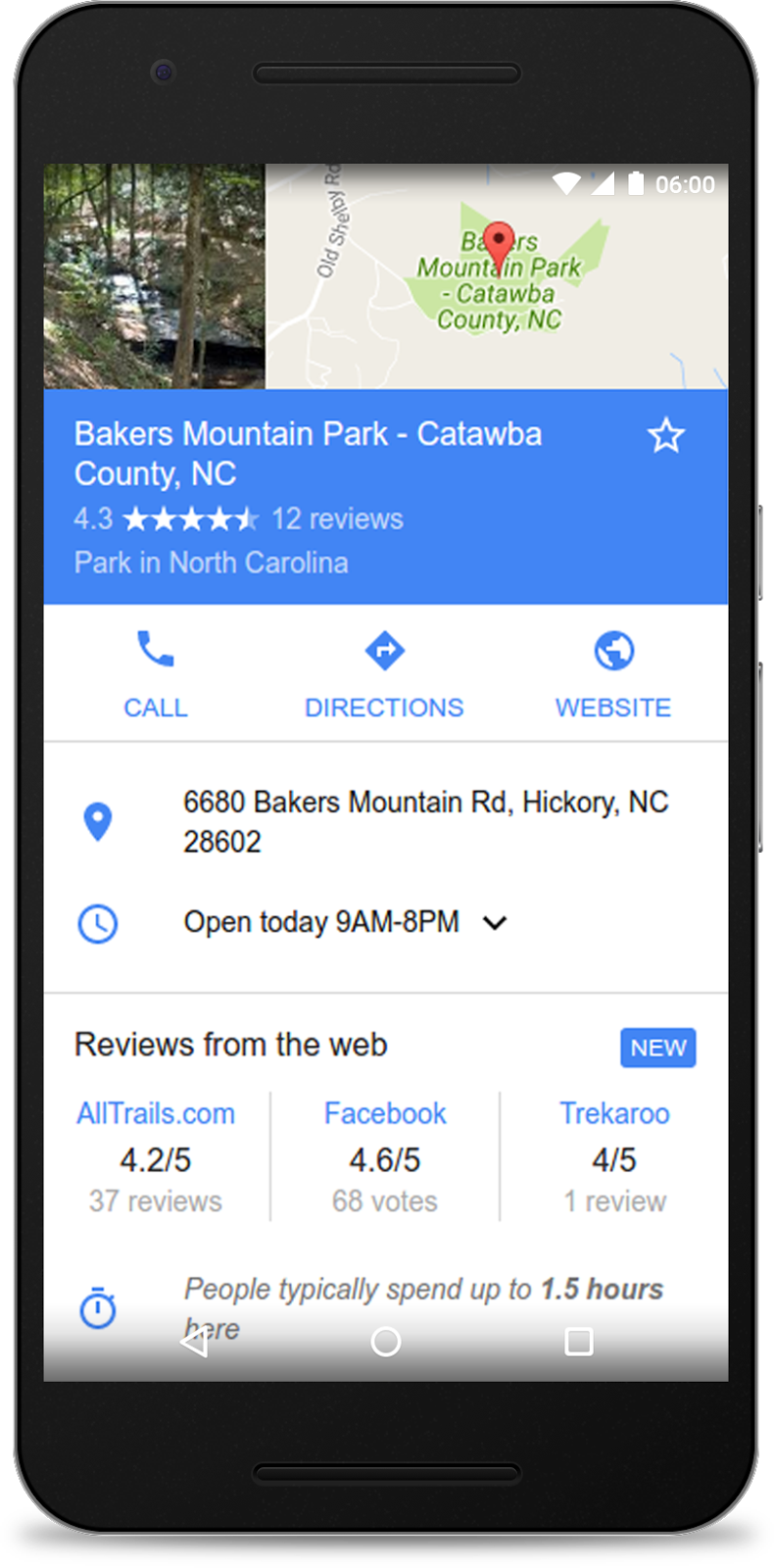
Today, we’re introducing Reviews from the web to local Knowledge Panels, to accompany our recently launched best-of lists and critic reviews features. Whether your site publishes editorial critic reviews, best-of places lists, or aggregates user ratings, this content can be featured in local Knowledge Panels when users are looking for places to go.

Reviews from the web
Available globally on mobile and desktop, Reviews from the web brings aggregated user ratings of up to three review sites to Knowledge Panels for local places across many verticals including shops, restaurants, parks and more.

By implementing review snippet markup and meeting our criteria, your site’s user-generated composite ratings will be eligible for inclusion. Add the Local Business markup to help Google match reviews to the right review subject and help grow your site’s coverage. For more information on the guidelines for the Reviews from the web, critic review and top places lists features, check out our developer site.
Critic reviews
In the U.S. on mobile and desktop, qualifying publishers can participate in the critic review feature in local Knowledge Panels. Critic reviews possess an editorial tone of voice and have an opinionated position on the local business, coming from an editor or on-the-ground expert. For more information on how to participate, see the details in ourcritic reviews page.
The local information across Google Search helps millions of people, every day, discover and share great places. If you have any questions, please visit our webmaster forums.


(Crossposted from the Google Security Blog.)
For more than nine years, Safe Browsing has helped webmasters via Search Console with information about how to fix security issues with their sites. This includes relevant Help Center articles, example URLs to assist in diagnosing the presence of harmful content, and a process for webmasters to request reviews of their site after security issues are addressed. Over time, Safe Browsing has expanded its protection to cover additional threats to user safety such as Deceptive Sites and Unwanted Software.

To help webmasters be even more successful in resolving issues, we’re happy to announce that we’ve updated the information available in Search Console in the Security Issues report.


The updated information provides more specific explanations of six different security issues detected by Safe Browsing, including malwaredeceptive pagesharmful downloads, and uncommon downloads. These explanations give webmasters more context and detail about what Safe Browsing found. We also offer tailored recommendations for each type of issue, including sample URLs that webmasters can check to identify the source of the issue, as well as specific remediation actions webmasters can take to resolve the issue.

We on the Safe Browsing team definitely recommend registering your site in Search Console even if it is not currently experiencing a security issue. We send notifications through Search Console so webmasters can address any issues that appear as quickly as possible.

Our goal is to help webmasters provide a safe and secure browsing experience for their users. We welcome any questions or feedback about the new features on the Google Webmaster Help Forum, where Top Contributors and Google employees are available to help.

For more information about Safe Browsing’s ongoing work to shine light on the state of web security and encourage safer web security practices, check out our summary of trends and findings on the Safe Browsing Transparency Report. If you’re interested in the tools Google provides for webmasters and developers dealing with hacked sites, this video provides a great overview.
 

In Google Search, our goal is to help users quickly find the best answers to their questions, regardless of the device they’re using. Today, we’re announcing two upcoming changes to mobile search results that make finding content easier for users.

Simplifying mobile search results

Two years ago, we added a mobile-friendly label to help users find pages where the text and content was readable without zooming and the tap targets were appropriately spaced. Since then, we’ve seen the ecosystem evolve and we recently found that 85% of all pages in the mobile search results now meet this criteria and show the mobile-friendly label. To keep search results uncluttered, we’ll be removing the label, although the mobile-friendly criteria will continue to be a ranking signal. We’ll continue providing the mobile usability report in Search Console and the mobile-friendly test to help webmasters evaluate the effect of the mobile-friendly signal on their pages.

Helping users find the content they’re looking for

Although the majority of pages now have text and content on the page that is readable without zooming, we’ve recently seen many examples where these pages show intrusive interstitials to users. While the underlying content is present on the page and available to be indexed by Google, content may be visually obscured by an interstitial. This can frustrate users because they are unable to easily access the content that they were expecting when they tapped on the search result.
Pages that show intrusive interstitials provide a poorer experience to users than other pages where content is immediately accessible. This can be problematic on mobile devices where screens are often smaller. To improve the mobile search experience, after January 10, 2017, pages where content is not easily accessible to a user on the transition from the mobile search results may not rank as highly.
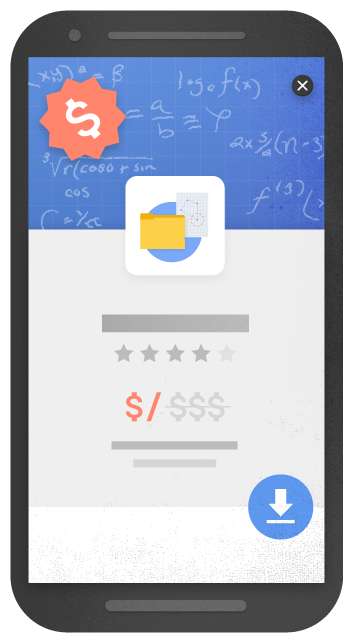
Here are some examples of techniques that make content less accessible to a user:
  • Showing a popup that covers the main content, either immediately after the user navigates to a page from the search results, or while they are looking through the page.
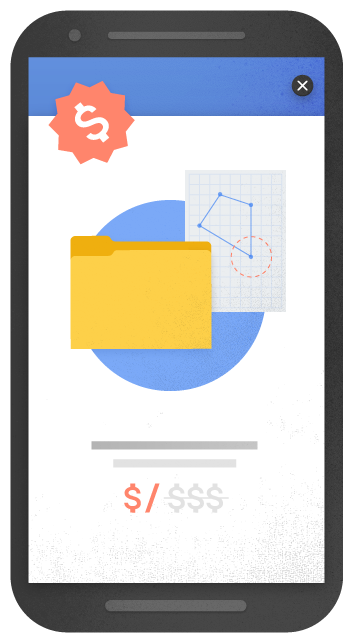
  • Displaying a standalone interstitial that the user has to dismiss before accessing the main content.
  • Using a layout where the above-the-fold portion of the page appears similar to a standalone interstitial, but the original content has been inlined underneath the fold.

Examples of interstitials that make content less accessible


An example of an intrusive popup

An example of an intrusive standalone interstitial

Another example of an intrusive standalone interstitial

By contrast, here are some examples of techniques that, used responsibly, would not be affected by the new signal:
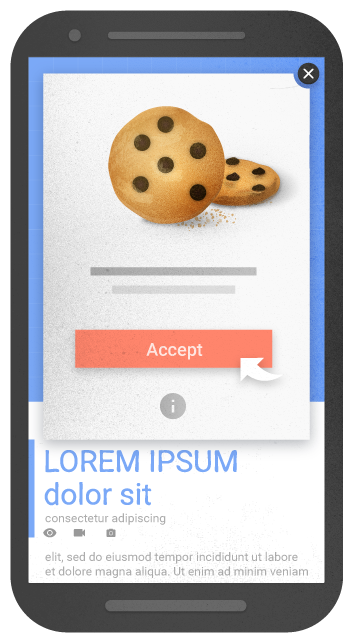
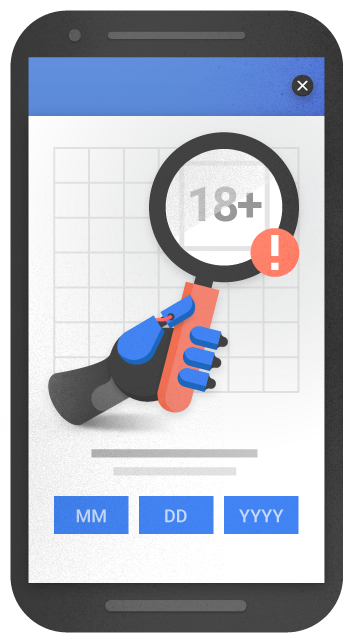
  • Interstitials that appear to be in response to a legal obligation, such as for cookie usage or for age verification.
  • Login dialogs on sites where content is not publicly indexable. For example, this would include private content such as email or unindexable content that is behind a paywall.
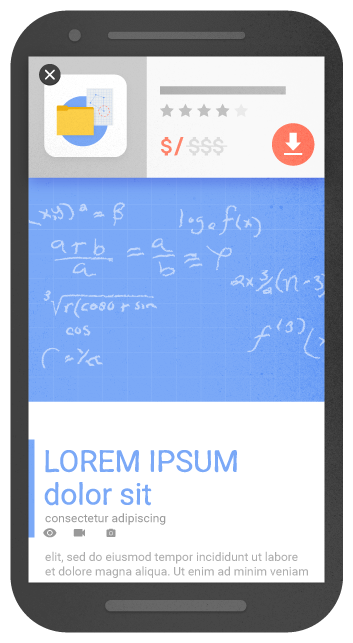
  • Banners that use a reasonable amount of screen space and are easily dismissible. For example, the app install banners provided by Safari and Chrome are examples of banners that use a reasonable amount of screen space.

Examples of interstitials that would not be affected by the new signal, if used responsibly


An example of an interstitial for cookie usage

An example of an interstitial for age verification

An example of a banner that uses a reasonable amount of screen space

We previously explored a signal that checked for interstitials that ask a user to install a mobile app. As we continued our development efforts, we saw the need to broaden our focus to interstitials more generally. Accordingly, to avoid duplication in our signals, we've removed the check for app-install interstitials from the mobile-friendly test and have incorporated it into this new signal in Search.
Remember, this new signal is just one of hundreds of signals that are used in ranking. The intent of the search query is still a very strong signal, so a page may still rank highly if it has great, relevant content. As always, if you have any questions or feedback, please visit our webmaster forums.

Since the launch of critic reviews last year, we have been focused on supporting more types of reviews, like restaurant reviews, cafes, or any other type of a local business. Recently we’ve announced the availability of critic reviews for local businesses. By incorporating structured data to their sites, publishers can promote their content onlocal Knowledge Graph cards and users can enjoy a range of reviews and opinions.
Critic reviews are available across mobile, tablet and desktop, allowing publishers to increase the visibility of their reviews and expose their reviews to new audiences, whenever a local Knowledge Graph card is surfaced. English reviews for businesses in the US are already supported and we’ll very soon support many other languages and countries.
Publishers with critic reviews for local entities can get up and running by selecting snippets of reviews from their sites and annotating them and the associated business with schema.org markup. This process, detailed in our critic reviews markup instructions, allows publishers to communicate to Google which snippet they prefer, what URL is associated with the review and other metadata about the local business that allows us to ensure that we’re showing the right review for the right entity.
Google can understand a variety of markup formats, including the JSON-LD data format, which makes it easier than ever to incorporate structured data about reviews into webpages! Publishers can get started here. And as always, if you have any questions, please visit our webmaster forums.
 

It's 2016 and it's hard to believe that browsing the web on a mobile phone can still feel so slow with users abandoning sites that just don't load quickly. To us — and many in the industry — it was clear that something needed to change. That was why we started working with the Accelerated Mobile Pages Project, an open source initiative to improve the mobile web experience for everyone.
Less than six months ago, we started sending people to AMP pages in the “Top stories” section of the Google Search Results page on mobile phones. Since then, we’ve seen incredible global adoption of AMP that has gone beyond the news industry to include e-commerce, entertainment, travel, recipe sites and so on. To date we have more than 150 million AMP docs in our index, with over 4 million new ones being added every week. As a result, today we’re sharing an early preview of our expanded AMP support across the entire search results page --not just the “Top stories” section.
To clarify, this is not a ranking change for sites. As a result of the growth of AMP beyond publishers, we wanted to make it easier for people to access this faster experience. The preview shows an experience where web results that that have AMP versions are labeled with The AMP Logo. When you tap on these results, you will be directed to the corresponding AMP page within the AMP viewer.
 
AMP in Search Preview
Try it out for yourself on your mobile device by navigating to g.co/ampdemo. Once you’re in the demo, search for something like “french toast recipe” or music lyrics by your favorite artist to experience how AMP can provide a speedier reading experience on the mobile web. The “Who” page on AMPProject.org has a flavor of some of the sites already creating AMP content.
We’re starting with a preview to get feedback from users, developers and sites so that we can create a better Search experience when we make this feature more broadly available later this year. In addition, we want to give everyone who might be interested in “AMPing up” their content enough time to learn how to implement AMP and to see how their content appears in the demo. And beyond developing AMP pages, we invite everyone to get involved and contribute to the AMP Project.
We can’t wait to hear from you as we work together to speed up the web. And as always, if you have any questions, please visit our webmaster forums.